Working with Quotes
 In EPiServer CMS, you can mark text as a quote, which is useful if you are working with accessibility on your website. With the Insert quote tool, you can format the text so that visitors using various aids to read the website can distinguish quotes from other text. You can format both short (part of a text) and long quotes (whole paragraphs) and you can enter a title and source for the quote.
Inserting a Quote
Insert a quote as follows:
- In the Editor, select the words or the paragraph that will form the quote.
- Select Quote in the toolbar.
- The Quote dialog is shown. Under Type of quote you can select whether the quotation is a Block quote (whole paragraph, one or more) or a Quote (part of a text). If you have chosen to enter a "quote" type of quote, this will be shown with a blue marking in the editor.
- Enter a title for the quote in the Title field.
- Enter the source in the Reference information about the quote field. This is often the URL address for a website.
- Select Insert.
If you look at the HTML code for the text, the quote part will receive the correct tagging, in this case the <blockquote> tag.
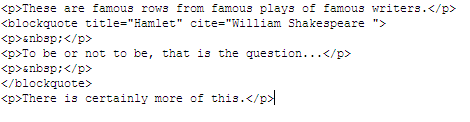
The appearance of the quote on the web page depends on how you have defined it in the style templates of your website. A quotation is usually marked with italic text, quotation marks or an indent.
Deleting a Quote
A quote can be removed from a text. This means that the quotation formatting tags will be removed from the text, but the text will still remain.
Delete a quote as follows:
- Open the text with the quote for editing.
- Select the quote by placing the cursor on it.
- Select Quote in the toolbar.
- Select Remove quote.
- Save the page to save the updatings.
Last updated: 2011-03-25 | Copyright © EPiServer AB