 Start/Stop Publish
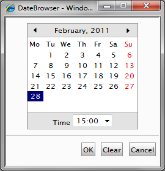 You can schedule the publishing of the pages you have created. You do this by specifying the dates and times between which the page should be displayed, e.g. 2001-04-01 08:00 up to and including 2001-04-30 16:00. Selecting the button next to the input field brings up a calendar in which you can select relevant date and time. If you leave the fields empty, the page will be published immediately and remain visible on the website for an indefinite period of time.
In such instances, you must manually delete the page if it is to be taken off the website. You can also use just one of the fields if you want to set either a start date or an end date. Don’t forget to click the Publish button after you have saved the page, otherwise, the page will not be published. Even though you click Publish immediately after saving the page, it will not become public until the selected date and time are reached.